Bar software · multi-venue and events
The queue,in order.
Your customers order and pay from their phone and pick up when it's ready. Your bar stops being the bottleneck.
The demo is the real thing, not a recording.
- 01Order
- 02Pay
- 03Pick up
The problem
At peak time you sell what you can, not what you want.
A queue isn't just a wait: it's the ceiling on your takings. While three people order at once and one hunts for change, twenty look at the line and turn around.
The sale nobody makes
It shows up in no report, because it never happened. It's the costliest one and the only one you can't win back.
Staff burnt out by the queue
The same person is cashier, preparer and complaints desk. They serve less and worse, and it isn't their fault.
Closing by guesswork
When the shutters come down nobody knows exactly what sold, at what time or by which method. Next week gets decided on a hunch.
How it works
Three steps, and none of them is standing in line.
- 01
Order
Scan the QR on the bar, the table or the poster. It's your menu, with your options, extras and bundles. Nothing to install.
- 02
Pay
Card, Apple Pay, Google Pay or Bizum. The amount is always recalculated on your server: the phone only sends references and quantities, never prices.
- 03
Pick up
They get a short code and a QR. When the order is ready they see it on their phone and on the venue screen, and collect it without waiting in the bar queue.
Inside the bar
A queue that sorts itself out
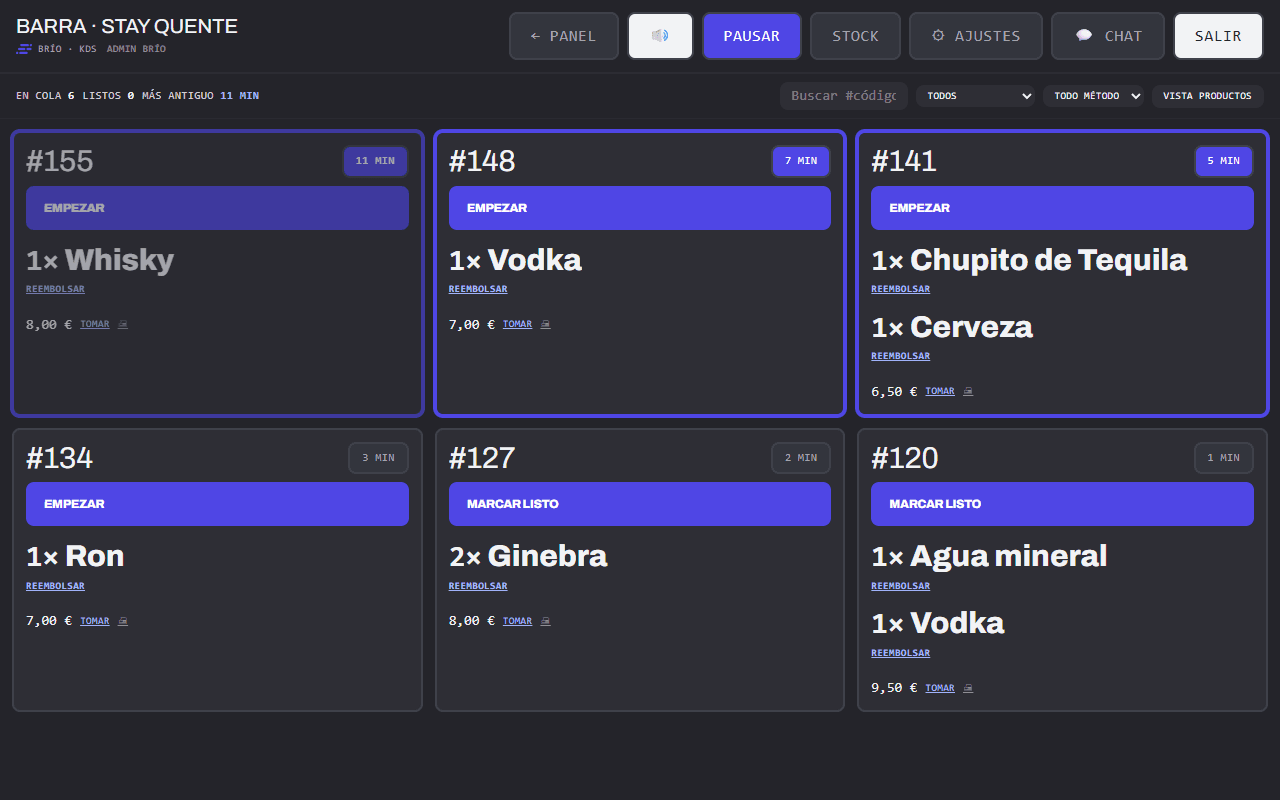
The preparation screen isn't a list of orders: it decides the order of work, flags what is running late and stops intake when the bar can't take more.
Spread across bars
Each order lands on whichever bar has the lightest load right then. Nobody has to hand it out.
Traffic light and rush mode
Every order carries its target time. As work piles up the screen switches itself to a denser view and warns once, not every ten seconds.
Prepare in batches
The per-product view groups identical lines: twelve of the same drink become a single round.
Out of stock, on the fly
Flag it from the screen itself and it leaves the menu instantly, with nothing to reload.
Automatic capacity brake
On reaching the cap of live orders, intake pauses and the staff are notified. It reopens by itself once load drops below 80%.
QR mode
Take the money first, serve later
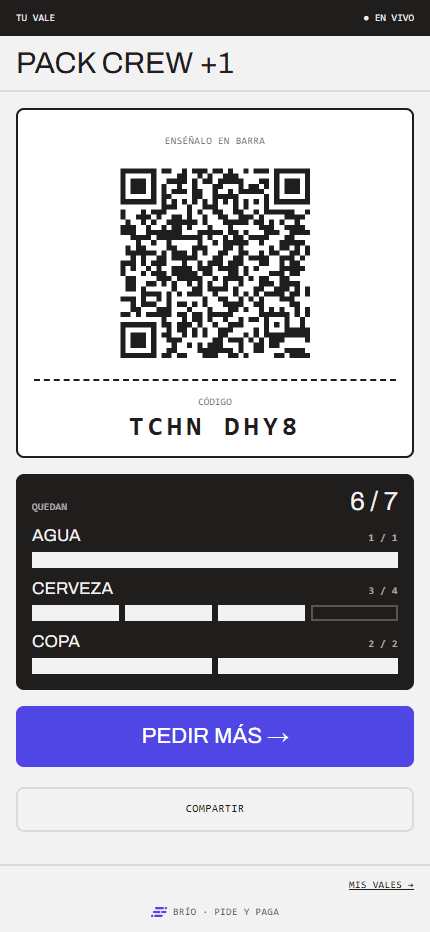
For events and busy nights: the customer buys a bundle from their phone and gets a QR holding credit. At the bar you scan it and draw down one unit at a time, without going through the preparation screen.
One unit at a time
One drink now and another two hours later. The balance lives in the QR and updates live.
60-second undo
A mistake at the bar is fixed on the spot. After that minute, only a manager can reverse it.
Shareable by design
The QR is a bearer token: pass it round the group and it works. What stops double spending isn't the code being secret, it's that the deduction is atomic in the database.
simultaneous redemptions against a single unit of credit: exactly one wins. No negative balance and a single entry recorded.
For your venue
One system, switched on to fit you
Brío is deployed per venue and every function can be switched on or off. A nightclub and a restaurant don't need the same things, and shouldn't have to carry the same weight.
Brío for nightclubs
19 of 19 features on by defaultThis is the case Brío was built for: a thousand people, three bars and the two hours that decide the night. In this vertical every feature ships switched on.
QR mode for the big nights
Sell bundles up front and redeem them at the bar one unit at a time, without going through the preparation screen. The balance lives in the customer's QR and updates live.
Tickets and the door
Ticket types with caps and sales windows, emailed with their QR, validated at the door. The door screen preloads the list, so it keeps validating even where there is no signal.
VIP tables and guest lists
Areas with a prepaid minimum spend that becomes group credit, shareable by link. Plus guest lists with their own access.
Any feature can be switched on in any vertical: what changes is what each business starts with.
Till and floor
Also for when people order out loud
Not everyone will order from a phone. The Brío terminal covers the bar at night and the floor by day, with the same menu and the same reports.
Floor plan
Editable tables, areas and fittings. Open tabs, split, merge and transfer between tables.
A real till
Cash or card, cash-up with denomination counting, receipts with tax number and legal name.
Staff
Per-operator PIN and time clock, with its own export.
Survives without a network
Sales queue on the device itself and upload by themselves when the connection returns, without duplicating.
Management
By closing time the numbers are already done
Everything that happens at the bar is recorded with its time, payment method and tax rate. There is nothing to reconstruct the next day.
Per-event report
Sales, orders, tips, average spend and hourly spread. With a printable view and CSV export.
Tax breakdown
Net and tax by rate and by payment method, ready for your accountant.
What actually sells
Rankings by product, brand and specific combination, not just by category.
Your customers
Profiles with their history and segments that compute themselves: dormant, top spenders, those sitting on unused credit.
Why it holds up
Built for a basement with bad reception
The hard part isn't a pretty menu: it's still working at 02:00, with the place full and the network at half power.
Live, with no reloading
State changes travel from the database to every screen over an open connection, reconnecting on their own.
Tolerant of a bad network
The app installs on the phone and keeps the essentials. If the network takes more than five seconds it serves the local copy instead of leaving a blank screen.
Prices aren't up for negotiation
They are always recalculated on the server against your catalogue. A customer cannot change what they pay by touching their phone.
Every station in its place
Five roles, each with its screen and its scope. A leaver or a role change takes effect immediately, without waiting for the session to expire.
It leaves a record
Staff actions are logged with who, what and when, and can be reviewed from the panel.
Watched
The infrastructure has metrics and alerts: if something falls over or degrades, the warning fires before your bar notices.
Let's take a look
Show us your bar and we'll show it to you working
Tell us what kind of venue you run and what you'd like to solve. We reply with a demo built around your case, not with a brochure.
Or try it right now
Scan with your phone and open the demonstration menu. It's the real application, with its cart and its test payment.
